SmartPilot X-5 Sport installed

A forum for discussing boat or trailer repairs or modifications that you have made or are considering.
Post Reply
User avatar
2BonC
First Officer
Posts: 307
Joined: Wed Jul 16, 2008 11:02 pm
Sailboat: MacGregor 26X
Location: Germany

SmartPilot X-5 Sport installed

Post by 2BonC »

Now I have finished the installation of my Raymarine SP X-5 hardware and wiring :P .
To do the work was not a big thing but it was quite time consuming.
The installation instruction are very detailed and well illustrated and easy to be followed and all required parts were very well sorted contained in the kit.
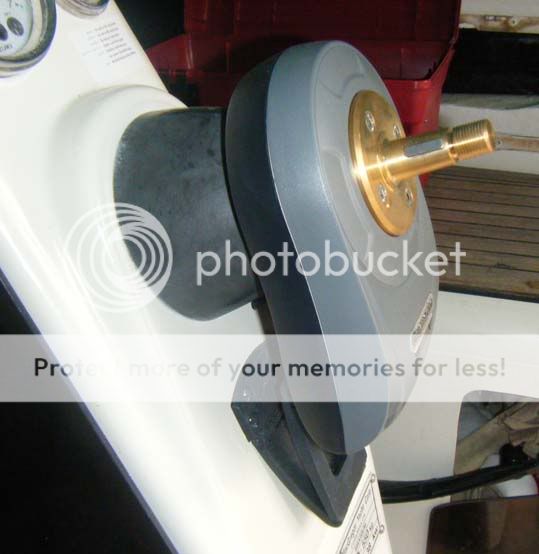
At first the SportDrive was installed. A minor problem was encountered inserting the new Woodruff key into the original steering shaft with it´s taper adaptor. The key had to be adapted a little bit.
Image
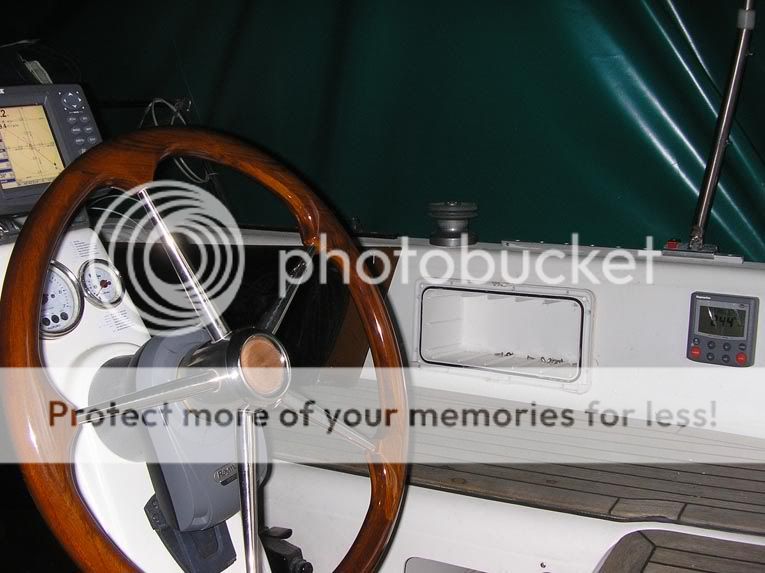
The second part was to install the SP-controller. As the pedestal is occupied by my Lowrence plotter I decided to mount the SP-controller to the starboard wall of the cockpit. There I can reach all it´s knobs and monitor the display without changing my position behind the steering wheel.
Image
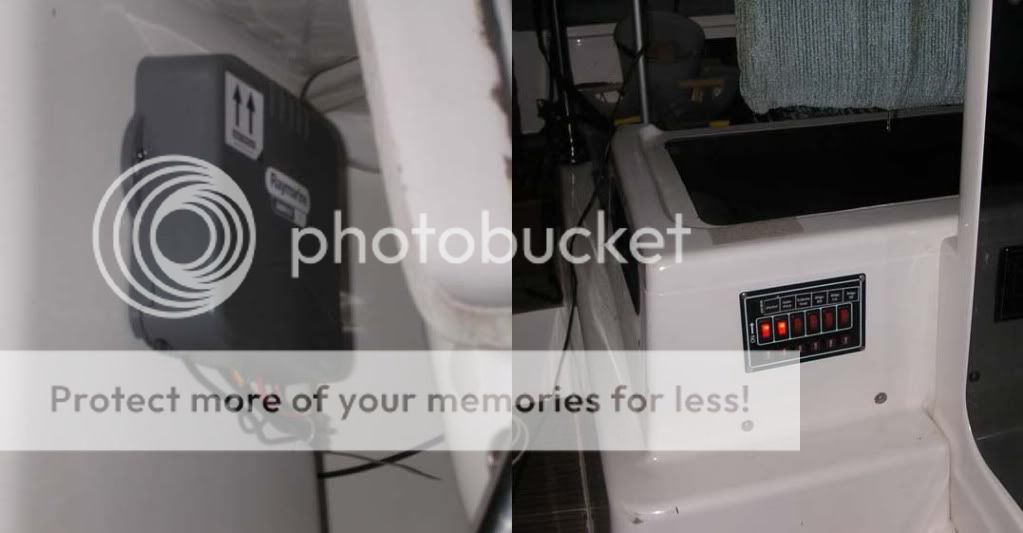
After installation of the fluxvalve (close to the root of the mast-support) and finding a place for the course computer the work I like most in a :macx: had to start: the wiring :x .
As You might imagine this was the hardest and most time consuming thing.
After I did not succeed in finding an appropriate routing for the power cable from the aux-switch of the :macx: original power switch panel to the course computer I decided to install an additional switch panel close to the fluxvalve and the course computer. I needed some sadditional power-switches for my bilge-pumps and a head-vent anyhow .
Image
I can asure You: It was really exiting to see the steering wheel move by it´s own when the AS was switched on and engaged the first time :P .
However as the boat is still on the trailer I could only initiate small automoves to both sides, that was it, now I´m looking forward to callibrate the system and give it a trail on the water. For me this will be the Lake Geneva at the end of May.

One thing is left :cry: does someone has ever connected a plotter to the autosteering system? I have the Lowrence LMS527, if You have a Lowrance plotter connected to any autosteering system please let me know which wires did You connect to which port of a coarse computer.

Rainer
User avatar
Matt19020
Captain
Posts: 576
Joined: Sat Jul 15, 2006 1:29 pm
Sailboat: MacGregor 26M
Location: Middle River, Chesapeake Bay MD...2007 MacM Suzuki DF70 4-Stroke ..... "My Time"
Contact:

Re: SmartPilot X-5 Sport installed

Post by Matt19020 »

Rainer I am just finishing the install of my Wheelpilot I have a Lowrance 3600c (looks similar to yours).
From memory ....I connected the NMEA 0183 to the controller and then connected the controller Seatalk wire to the computer. On initial testing it appears to have seen a waypoint I stored and attempted to steer towards. It will be another week until I am in the water and able to perform sea trials.
***On my GPS I had to go through the menu and turn on the NMEA 0183 output for that wire . I can give you more specific info if requested.

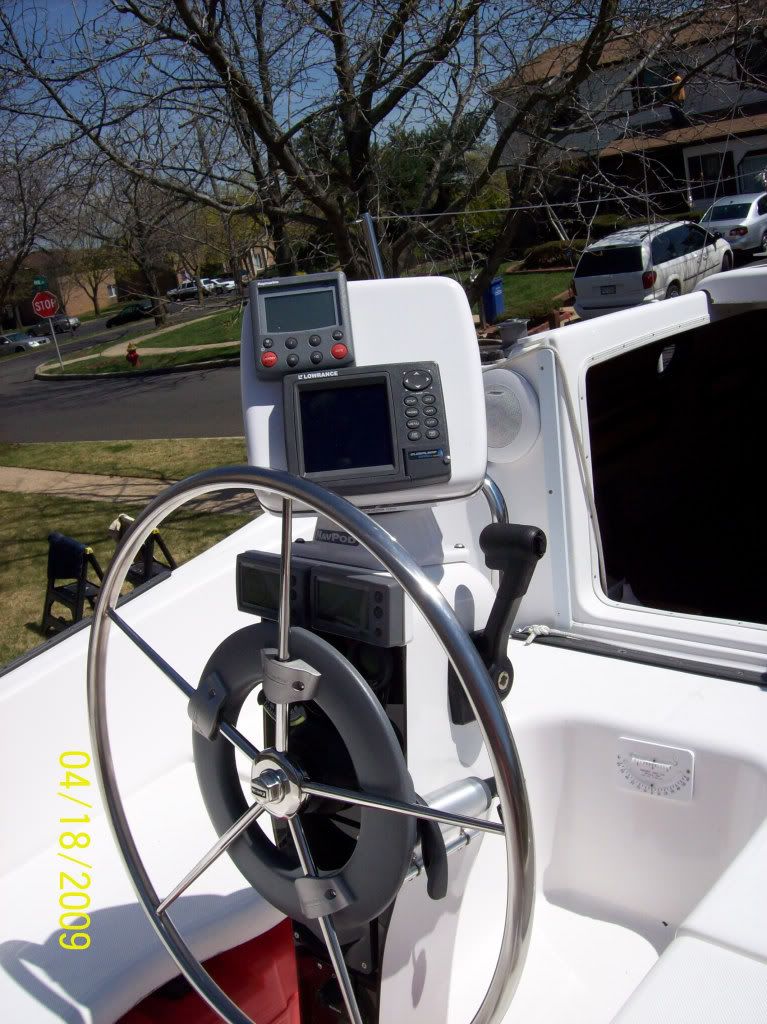
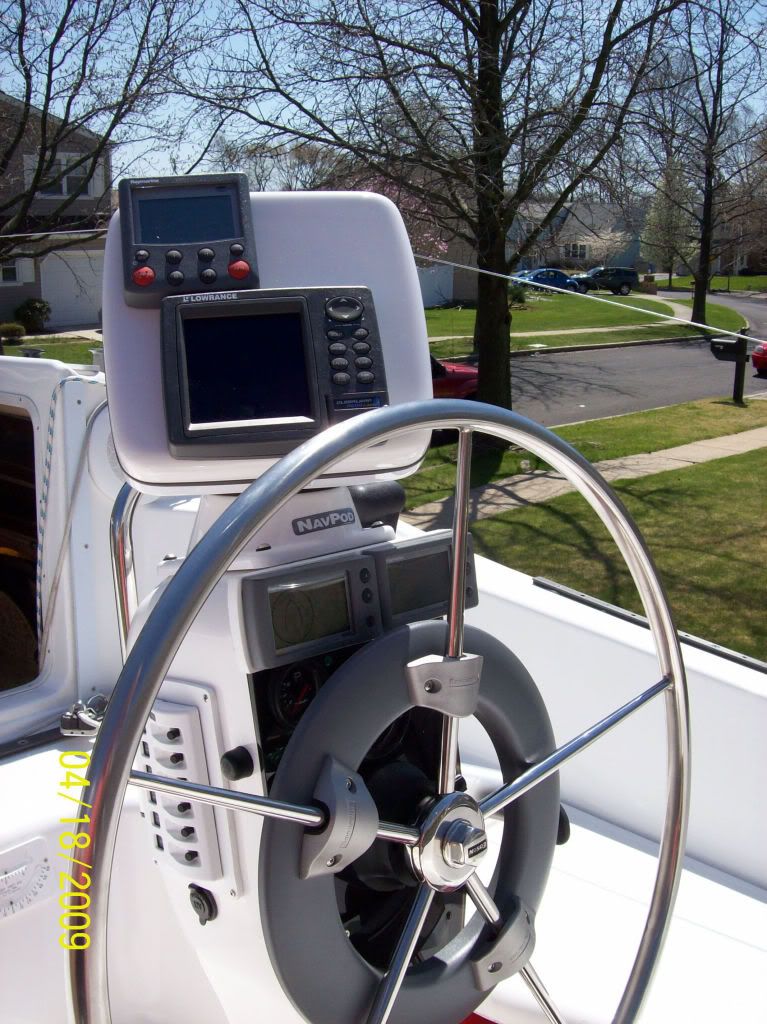
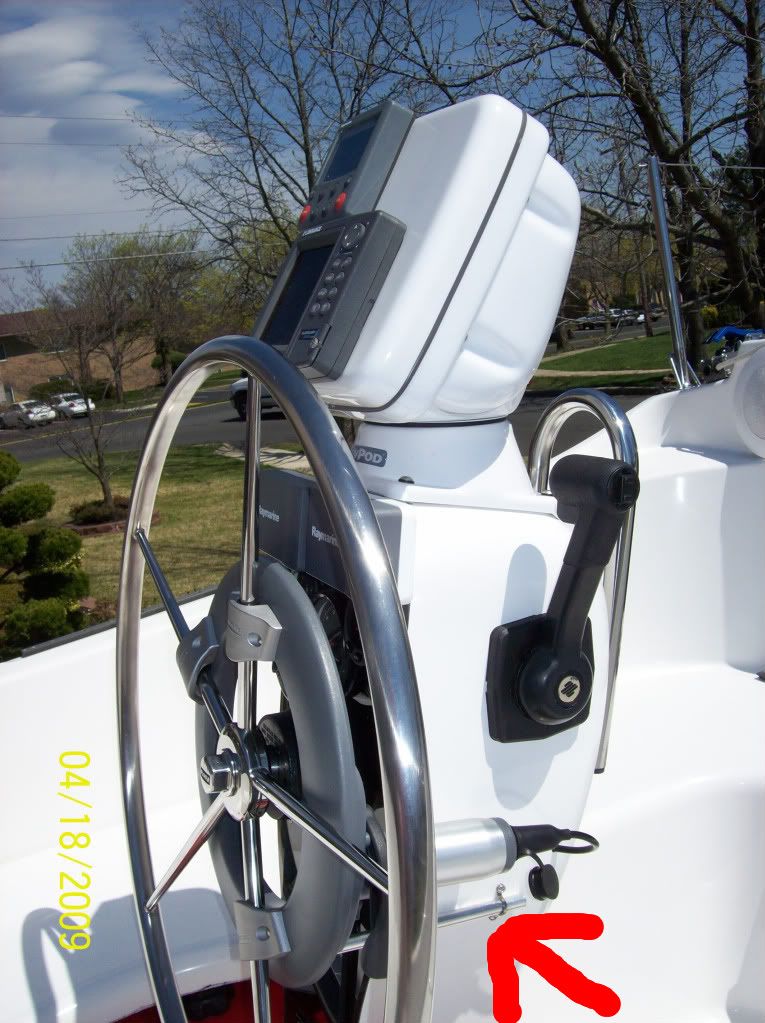
Installed unit and electronics:
Image

Image
Image
Last edited by Matt19020 on Sat Apr 18, 2009 2:49 pm, edited 2 times in total.
User avatar
Indulgence
First Officer
Posts: 206
Joined: Mon Aug 11, 2008 6:53 pm
Sailboat: MacGregor 26X
Location: Calgary, Ab, Canada

Re: SmartPilot X-5 Sport installed

Post by Indulgence »

One of these was installed on Indulgence. The motor unit has been sitting in my
garage for years. The PO said it dragged on the steering because you had to turn
the motor even when it wasn't engaged. I would kind of like to have the option
of using it but I prefer being directly connected to the rudders. I was thinking,
considering all the wiring and GPS and so on are in place, a new controller might not be
such a bad thing to think about.

Does yours disengage when you turn it off or do you feel the mechanism drag on the wheel?

thanks,
Laurie
User avatar
c130king
Admiral
Posts: 2730
Joined: Sun Nov 05, 2006 5:30 pm
Sailboat: MacGregor 26M
Location: Wiggins, MS --- '05 26M "König" w/ 40hp Merc
Contact:

Re: SmartPilot X-5 Sport installed

Post by c130king »

Matt19020 wrote:From memory ....I connected the NMEA 0183 to the controller and then connected the controller Seatalk wire to the computer. On initial testing it appears to have seen a waypoint I stored and attempted to steer towards. It will be another week until I am in the water and able to perform sea trials.
***On my GPS I had to go through the menu and turn on the NMEA 0183 output for that wire . I can give you more specific info if requested.
Matt,

Having read the instruction manual I am considering doing this as well since my GPS is sitting up on the pedastal where the controller will be. If that works then I don't have to run a wire (or extend the one that already exists but is sitting unused inside the pedastal) from the GPS all the way to the computer inside the cabin.

Appreciate any other feedback, experience or "words from the wise" that you may have on doing this.

Thanks,
Jim

P.S. Will be back in the U.S. on 16 May for a week of working on my boat... 8) 8) (installing autopilot, fuse panel, dual batteries/switch/combiner, VHF + antenna, marine stereo, plus a few other odds & ends depending on how much time I have available) Dad is getting ready to sell his house and buy a big 40' motorhome and hit the road for a few years...have to take advantage of his time and tools before he sells and gets rid of all his stuff.
User avatar
2BonC
First Officer
Posts: 307
Joined: Wed Jul 16, 2008 11:02 pm
Sailboat: MacGregor 26X
Location: Germany

Re: SmartPilot X-5 Sport installed

Post by 2BonC »

Hallo Laurie,
Your question made it clear to me that it is quite difficult to give an accurate approximation for the relation of forces before and after installation of the SPX 5. :?
As far as I remember there is not a notable difference in force required to move the wheel between SPX 5 Sport installed and not installed. However I cannot compare directly as the SP is installed now and I didn´t pay to much attention to the required force before.
On the trailer I can´t feel any difference in required force to move the wheel either the SP is totally off, switched on or switched on and engaged (Auto-mode). Even with a steering input selected (e.g. 10°) in the auto-mode it can be acted against the motor without extra force. :o . I can´t explain that but I have just confirmed it on the boat. To answer Your question, in my opinion the system does not disengage at all.

What I really don´t like even before testing the SP in the water is the play within the motor-unit. The brass cone You might see on my first picture, called "stub shaft" in the manual, is mounted on a brass ring on the motor side by four screws. Also this ring seems to have only little radial play by itself the long lever to the outer part of the steering wheel is creating a dangle feeling, on top the wheel moves by about 3 mm:( . My first impresion was, the wheel was loose on the cone.
Does somebody else has this problem and can confirm my impression?

Rainer
User avatar
Duane Dunn, Allegro
Admiral
Posts: 2459
Joined: Fri Jan 02, 2004 6:41 pm
Sailboat: MacGregor 26X
Location: Bellevue, Wa '96 26x, Tohatsu 90 TLDI and Plug In Hybrid Electric drive
Contact:

Re: SmartPilot X-5 Sport installed

Post by Duane Dunn, Allegro »

I can't speak to the X-5 version, but the earlier Sport Pilot+ I have has always had a bit of play in it. This was a common complaint with the Sport Pilot, sounds like the new model shares the same design. After 5 years and many miles of use I've had no problems and can't say I even notice the play anymore..

Image

You will certainly want to hook the AP to your plotter. While the pilot will steer well using the compass this does not account for current, etc. I find mine steers much better heading to a waypoint than it does by compass alone. As you drift off course to one side or the other it compensates as needed to bring you to the waypoint. With the compass alone all you are doing is keeping a constant heading.

The connection is easy, just two wires. Your AP installation instructions should identify a pair of wires for NMEA input. This is a different set than SeaTalk which is a Ray Marine proprietary system that would only be used if your plotter was a RayMarine unit. On my AP it is a thin red and black wire, the red being the NMEA in and the black being the ground.

Once you find these you then need to locate the NMEA out wires on your Plotter. My plotter is an Eagle which is a rebadged Lowrance. It did not have the wires needed as part of the base package. It required an additional cable. Unfortunately it used the same physical plug as my speed through water / temp transducer so I had to do some detective work to come up with a way to connect all three. This is what worked for me, your unit may have more plugs which would make this easier.

Image
Click for a bigger image

I think this would have worked too without the special cable
Image
Click for a bigger image
User avatar
2BonC
First Officer
Posts: 307
Joined: Wed Jul 16, 2008 11:02 pm
Sailboat: MacGregor 26X
Location: Germany

Re: SmartPilot X-5 Sport installed

Post by 2BonC »

Thanks for Your help Matt and Duane Dunn,

did I understand you right Matt, You have connected the NMEA0183 to the controller, not directly to the course computer as I did? I will try tomorrow. Please let me know the result after Your sea-trials.
I´m a little bit confused, the manual of the Lowrence plotter is talking about NMEA 0183, NMEA 2000 and RS-232 COMM.
I´m aware of NMEA 0183 and RS-232 Comm but does the NMEA 2000 includes NMEA 0183?

The following statements are published in the Lowrance plotter manual:

The network and any NMEA 2000 devices, including the GPS
module, will not operate unless the NMEA 2000 Power Cable is
connected to power. The NMEA 2000 power cable must be connected
to power even if your only NMEA 2000 device is the GPS module and it
is connected to the display unit's Network socket.


and:

(Data cable)
To exchange NMEA 0183 data, this unit has one NMEA 0183 version
2.0 communication port. Com port one (Com-1) can be used to receive
NMEA format GPS data. The com port can also transmit NMEA format
GPS data to another device.
The four wires for the com port are combined with the Power Supply
cable and NMEA 2000 Power cable to form the power/data cable
(shown earlier). Com-1 uses the yellow wire to transmit, the orange
wire to receive and the shield wire for signal ground. Your unit does
not use the blue wire.


Now I´m not sure, I would connect the yellow wire to the NMEA 0183 + and the shield to NMEA 0183 - at the smart pilot controller. I think this will be similar to the drawing No. 2 from Duane Dunn. A´m I right and must the NMEA 2000 network be powered up to get data out of the plotter? :|

Rainer
User avatar
Matt19020
Captain
Posts: 576
Joined: Sat Jul 15, 2006 1:29 pm
Sailboat: MacGregor 26M
Location: Middle River, Chesapeake Bay MD...2007 MacM Suzuki DF70 4-Stroke ..... "My Time"
Contact:

Re: SmartPilot X-5 Sport installed

Post by Matt19020 »

Rainer,
You are correct. I connected the NMEA 0183 from the Lowrance directly to the Raymarine controller module and the Seatalk wire from the controller directly to the Raymarine computer. It appears to be performing as expected.
User avatar
2BonC
First Officer
Posts: 307
Joined: Wed Jul 16, 2008 11:02 pm
Sailboat: MacGregor 26X
Location: Germany

Re: SmartPilot X-5 Sport installed

Post by 2BonC »

:D :D :D ..I did it!!!
After getting some help from the pages (thanks again Matt & DD) and support from the manufactur of the plotter and the autopilot (Raymarine) I finally was able to persuade my Lowrance plotter to talk to the SPX-5 :) .
Now as I have solved all problems it sounds easy, however before that no where the combined information was puplished what to do and what could be expected at the displays. In the following You will find my collected information.

Cables: Connect the NMEA Out (at Lowrance LMS-527cDFiGPS, RS 232 yello cable) from Plotter to Course Computer NMEA 0183 +/IN and
the plotter cable shield to Course Computer NMEA 0183 -/IN. Forget everything about NMEA 2000 :wink:.
at the plotter configure the NMEA 0183 traffic as follows

1) Press MENU 2x
2) Select SYSTEM SETUP
3)Press RIGHT ARROW key
4) Select COMMUNICATIONS PORT
5)Configure BAUD RATE for 4800
6)Select NMEA 0183 OUTPUT

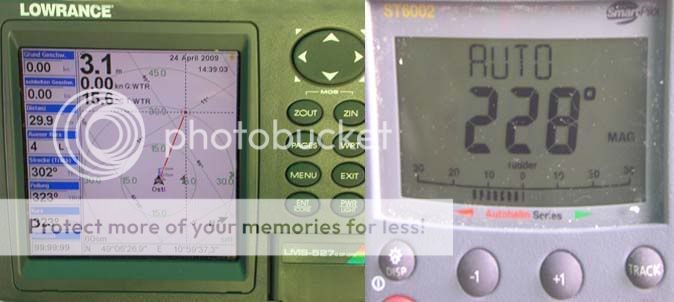
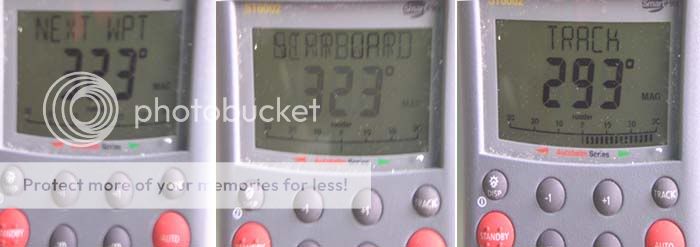
Select a Wpt or steering route at the plotter, at the controller select STBY and AUTO
Image
Notice, also no rudder sensor is installed, the rudder indicator is displayed starting with indication of "0" on selection of "AUTO"

Select TRACK at the controller: warning sound comes on, the controller display is alternating between "Next Waypoint" and the expected direction of turn, here "Starboard".
Select TRACK again, turn is initiated and TRACK is indicated.
Image

I hope this might help somebody to save some time when installing a selfsteering system
Rainer
User avatar
Highlander
Admiral
Posts: 5995
Joined: Wed Sep 21, 2005 8:25 pm
Sailboat: MacGregor 26M
Location: Maccutter26M 2008 75HP Merc. 4/S Victoria BC. Can. ' An Hileanto'ir III '
Contact:

Re: SmartPilot X-5 Sport installed

Post by Highlander »

Rainer

My Lowrance 7500c manual says not to use the blue wire also , but then I found inside the box an manual update supplement saying my unit has since been updated & now has com1 & com2 ports & I can use the blue wire :)

J
User avatar
2BonC
First Officer
Posts: 307
Joined: Wed Jul 16, 2008 11:02 pm
Sailboat: MacGregor 26X
Location: Germany

Re: SmartPilot X-5 Sport installed

Post by 2BonC »

thank You for the hint but what do You use it for? Actually I think I don´t need it because everything is working fine :) .

Rainer
User avatar
Highlander
Admiral
Posts: 5995
Joined: Wed Sep 21, 2005 8:25 pm
Sailboat: MacGregor 26M
Location: Maccutter26M 2008 75HP Merc. 4/S Victoria BC. Can. ' An Hileanto'ir III '
Contact:

Re: SmartPilot X-5 Sport installed

Post by Highlander »

Speed sensor on the water !

J
Post Reply