Page 1 of 4

Cheap Electronic Water Bladder Level Meter

Posted: Wed Mar 03, 2021 8:44 am
by Inquisitor
For my Mac renovation, I've been bouncing around on what kind of water storage. Hard tanks, bladders, multiple OEM 5 gallon carriers, putting something in the ballast tank... nothing was discounted without some thought. In some things, I try to use the KISS principle (others... not so much :D ). Water bladders seem to me to be about the simplest by the time you consider the full installation. In the same timeframe ris just happened to show his system viewtopic.php?f=8&t=28112. I really like the thoroughness of thought that went into it. The only concern I had was not knowing how much water I'd have left in the bladder hidden under the V-berth... especially if I had non-economical users on board. JimmyT came up with a great idea viewtopic.php?f=8&t=28112&p=347984#p347982 that I thought I could simplify just a little with one of my other hobbies... microprocessor programming.

Here is the finished design...

It uses three cheap, off-the-shelf parts easily obtained through eBay.
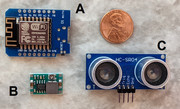
  1. ESP8266 Wemos development board ($3 to $5)* - This is a microcomputer that can be programmed to act like a small operating system and host web applications that can be accessed from any Browser - PC, tablet, phone, etc.
  2. DC-DC converter ($1.30)* - This converts the 12 volts DC of the boat to the 5 volts required by the microcomputer.
  3. HC-SR04P Ultrasonic range transducer (< $1)* - This uses sonar to detect the range to some obstruction.
* Most of the time, these items can be purchased in the US singly for around double the price. These prices reflect getting small quantities say... 5 pieces from China.
Image

Assembly requires a small amount of soldering. Programming requires a PC and a USB-micro cable. I host/volunteer for a local Maker's group in my small town. One user wanted to use a Mac and I know it can be done, but we couldn't get it working. I don't speak Apple.
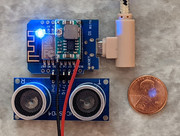
Image

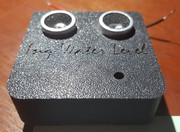
I printed a 3D case for it... well... because I can and it was faster, lighter and better looking than one made of wood.
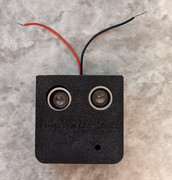
Image

The software is uploaded via the USB the first time.

Image

And lastly, here it is working in a test rig... :D
https://youtu.be/H-Lp3hXDX0A

If anyone is remotely interested in making one, just chime in here. I can give more details and instructions and software required.

Re: Cheap Electronic Water Bladder Level Meter

Posted: Wed Mar 03, 2021 11:33 am
by Jimmyt
Excellent! :wink:

Re: Cheap Electronic Water Bladder Level Meter

Posted: Wed Mar 03, 2021 8:22 pm
by Inquisitor
Well, I've had one brave soul wanting to try it out. Although I don't mind private messages, I'd prefer people ask questions in this thread. That way, I only have to explain it once. :) and others will note your bravery 8) (or trusting nature :?) Although I don't want to discourage anyone, I'd like you to have as much information as you can before starting...

In General...
  1. Working with microprocessors can be addicting. Home automation (smart home) projects alone are endless. It is very easy and cheap to create meaningful/useful projects. Once you're able, you'll wonder why "smart-stuff" are so expensive. You don't have to be a EE to do this stuff. I'm not. There are so many cook-book projects available, you'll never be "the first one" wanting to do something with these things.
  2. There is absolutely no warranty! On the parts, on my project, on you frying some part. Being careful, you might buy the three parts, put them together and load the software in less than an hour and it work perfectly for you. But buying in China is time consuming. You fry your only part and you're waiting a month for a $1.29 replacement. Buy in quantity, expect to screw up, but expect many rewarding projects to follow on.
  3. These parts are sensitive. Static discharge will fry them. Putting 12 volts to parts made for 3.3 volts or even 5 volts will fry them. Reversing the polarity will fry them... or as my EE brother-in-law says, "if you let the magic smoke out, it'll never work again... keep the smoke inside."
  4. You have to be able to solder. Have a solder iron. Have good solder. If you're afraid of tin/lead solder... I don't know what the alternative is. You'll have to figure out that on your own. I do know the versions with a tiny bit of silver made soldering a cake-walk for me. Before, I had troubles.
Specific to this project...
  1. No warranty.
  2. Haven't put it in a boating environment.
  3. Although you could seal up the electronics, the ultrasonic transducer probably couldn't take a dose of water splashed onto the speaker cones.
  4. I've tested it only about what you've seen in the video above.
  5. At full tilt - taking 50 readings a second (to average the readings), sending out 1 reading a second, having multiple phones, tablets and computers hooked up to it, I measure it using 0.7 watts of power. You could easily put it on a switch and just power it long enough to get a reading. It boots up in a couple of seconds and is ready for a client to connect. I've also seen where projects with this device can run over a year on a pair of AA batteries, so there are software tricks that can be used. I might add those some day.
  6. I've found the ultrasonic device to be a bit touchy. For instance...
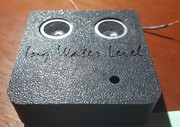
    1. The minimum working distance is 2 cm. The sound just can't go out one speaker, reflect and come back in the other with shorter distances. I've set the software to ignore readings in this area. So, you'll get no difference in "full" readings between pressed up against the sensor and 2 cm away from it. YMMV.
    2. In a first cut of a case, I had the sensors flush with the face. All my readings were as if something was about 2 inches away even when the nearest thing was feet away. I thought something was wrong with the software or a loose connection or something until... I took it out of the case and it worked flawlessly.
      Image
      I still can't explain why that version does what it does (something with acoustics), but once I extended the sensors out a little, it worked like a champ.
      Image
      Point being... if you ad-lib too far from my instructions you might be in uncharted territory.
If I think of more got'cha's, I'll add them here.

Now... I'll start adding steps in the following posts. Ask for clarification, why's, what's or whatever's, I'll add responses to the thread. Just like in school... if the question crossed your mind, it probably did other's as well. You were just braver and raised your hand first. :wink:

STEP 1 - Parts

Posted: Wed Mar 03, 2021 9:18 pm
by Inquisitor
You might get this stuff on Amazon also, but if eBay... Are you newbe when it comes to eBay purchases? Are you a pro shopper? Before purchasing...
  • I don't buy unless they have a better than 99% rating with lots of sales. Image
  • If buying from China, make sure you look at the delivery time. Some might be 15 days out, some might be two months. Difference in price may be negligible.
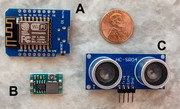
I've not purchased this stuff in some time. I had it all on-hand. Like I said, I buy in bulk and expect to use it "someday". These are the parts you need. ... and you'll need tools, solder, wire, etc.
Image
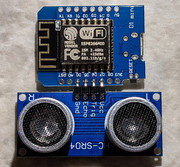
  1. WeMos D1 Mini - There are many flavors of this and the software has to be specifically modified and compiled for each. I don't plan on helping out with any other flavor. The "other flavors" are visibly different than this picture. If it looks like this, it is this. Here is one vendor. I've not purchased from them, nor am I getting some kind of kick-back. You can easily find other vendors. You probably can get it for about $3 per piece if you buy 5. If you buy in quantity in China, you can get it for about $1.50 per piece. https://www.ebay.com/itm/D1-Mini-NodeMC ... 3845558271
  2. DC-DC Step-down converter - This is what converts the boat's 12 volts down to the 5 volts the WeMos requires. The one in the picture is a variable one that I used. It is very touchy setting the output voltage. I purchased the following "fixed" version to make things easier in the future. I'll be trying it out once it arrives this Saturday. https://www.ebay.com/itm/5pcs-MP1584-5V ... 2416728301
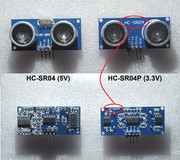
  3. HC-SR04P - This is the ultrasonic sensor. There are two kinds. HC-SR04 is a 5 volt version. The HC-SR04P is a 3.3 volt version. You must get this HC-SR04P version. I have both and the 5 volt version does not work consistently with the WeMos. The P version works every time.
    Although the 5 volt version is a dime a dozen, the P version is hard to find and hard to discern and many vendors don't really know the difference. Here are pictures of the ones I have... front and backs. Note the P doesn't show the P on the front, but in fine print on the back it shows the P.
    Image
    Looking just now, I could not find any US vendors that had one. YMMV. I found this posting. Unfortunately, its for 10 pieces and its in China. But the lead time is less than a month. They're also only $1.19 a piece delivered. https://www.ebay.com/itm/10PCS-Ultrason ... 3229721384

Re: Cheap Electronic Water Bladder Level Meter

Posted: Thu Mar 04, 2021 4:10 am
by adudinsk
Great Idea!
(now I need a water bladder holding tank so I can make this device)

Looking to make a fuel flow monitor.. so I can track mpg/fuel burn etc.. on an Carb'ed merc. Only problem is its HARD HARD to find an appropriate flow sensor with the correct/needed range...

AD

Re: Cheap Electronic Water Bladder Level Meter

Posted: Thu Mar 04, 2021 5:01 am
by Inquisitor
adudinsk wrote: Thu Mar 04, 2021 4:10 am Great Idea!
(now I need a water bladder holding tank so I can make this device)

Looking to make a fuel flow monitor.. so I can track mpg/fuel burn etc.. on an Carb'ed merc. Only problem is its HARD HARD to find an appropriate flow sensor with the correct/needed range...

AD
I can imagine that'd be difficult. Low flow rate, gasoline safe. I have some flow sensors, but they're only good down to 1 liter/minute and they're not fuel safe. I'm not too sure how accurate they are, but have you considered doing the old fashion way of using the vacuum? Just blue sky'ing here... it would require a lot of mapping. IOW, setting a throttle position/speed, and measuring the fuel flow with a graduated cylinder of fuel. That'd give you one data point for a fuel rate vs vacuum curve. Since its a "calculated" fuel usage, its not very consistent. Things like state of tune would change the flow rate. But, its way cooler than using a stick to see how much fuel you have left. :D

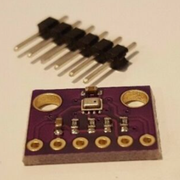
You could use a BMP280 pressure sensor instead of the ultrasonic sensor above. The microprocessor above is easily capable of that kind of stuff, and the total outlay would be about the same < $10.
Image

Re: Cheap Electronic Water Bladder Level Meter

Posted: Thu Mar 04, 2021 6:48 am
by Russ
Very cool.

Home automation is addictive. I've done some stuff with Smartthings and WebCore. Since Samsung is getting out of the hub biz, I moved to Hubitat. I also did some toying with Arduino's and Pi's.
Just got one of those Litter Robots which is awesome. The thing is smart and connected so I can have it work with the hub to change the color of the light in the room when the box is getting full which also carries high WAF.

With your project, I assume the water bladders vent air so there is no air pocket to mess with your level gauge. BOAT's ballast level gauge is also a cool micro project.

Re: Cheap Electronic Water Bladder Level Meter

Posted: Thu Mar 04, 2021 7:34 am
by Inquisitor
Russ wrote: Thu Mar 04, 2021 6:48 am Very cool.

Home automation is addictive. I've done some stuff with Smartthings and WebCore. Since Samsung is getting out of the hub biz, I moved to Hubitat. I also did some toying with Arduino's and Pi's.
Just got one of those Litter Robots which is awesome. The thing is smart and connected so I can have it work with the hub to change the color of the light in the room when the box is getting full which also carries high WAF.

With your project, I assume the water bladders vent air so there is no air pocket to mess with your level gauge. BOAT's ballast level gauge is also a cool micro project.
I don't have my bladder yet, but I'd assume they don't vent. Water goes in, water goes out. No air gets in to form an air pocket. The bladder simply collapses till its flat as a pancake. That's the only way this Level Meter will work.
If I remember correctly, BOAT's actually goes-in/touches the water. This one certainly won't do that. :)

STEP 2 - Loading Software

Posted: Fri Mar 05, 2021 6:14 am
by Inquisitor
WOW! It was harder and more time consuming to find out how to load software on the microprocessor than I would have thought. I didn't want anyone to have to install the full development environment. It can be a PITA even when you want to program the things. Since 99.99% of the people seem to use that method, it was a little buried on the Internet on how to do this 0.01%.

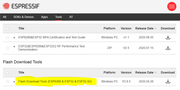
STEP 2A - Download the utility from the microprocessor manufacturer. Here is the link to a long list of developer tools: https://www.espressif.com/en/support/do ... ther-tools
You'll need to download the highlighted one. It is for Windows. Sorry Mac people, I didn't see one for you. After the download you'll need to "Extract All" to some folder. It is ready to use and doesn't require an install process.
Image

STEP 2B - Download my application https://inqonthat.com/wp-content/upload ... .1.0.0.zip. It too, will need to be extracted and you will find a single bin file: InqWaterLevel.1.0.0.bin

STEP 2C - Using a USB micro cable, connect your WeMos microprocessor to your computer.

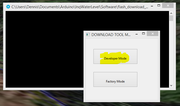
STEP 2D - Run the exe found in your extracted tool folder: flash_download_tool_3.8.5.exe (or whatever version you get). It is not the most user friendly piece of software I've used and is mainly a developer's tool. We're supposedly more tolerant of bad UI design. :) Hey... but it's free. It will pop up a command window and the first choice:
Image
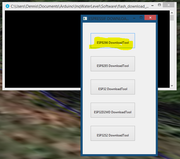
Select the Developer Mode... You'll get:
Image
Select the ESP8266 DownloadTool... You'll get:
Image
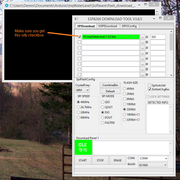
Fill out all the boxes as you see in this image. If you miss something, the error messages are either non-existent, in Chinese, or cryptic.
  • Obviously, the first green highlighted box is referencing the bin file you downloaded to some location on your computer. Yours will be different.
  • Make sure you get every item filled out... especially the little check box that I missed and for the longest time and couldn't figure why I wasn't getting anything uploaded.
  • The COM: COM4 port will likely be different on your computer also. It should be in the drop down to select.
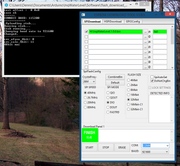
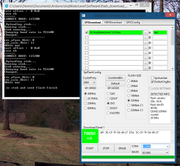
STEP 2E - Press the ERASE button. This will erase the memory on the WeMos board. It took about ten seconds to "FINISH" as shown here. You get a little diagnostics (shown) in the command box.
Image

STEP 2F - Press the START button. This will upload the binary to WeMos board. It took about another tens seconds to "FINISH" as shown here.
Image

STEP 2G - Did I really get it uploaded? Leave the WeMos microprocessor plugged up. We will go through a thorough testing after we have attached all the hardware. For now... we just want to see if we successfully uploaded the software. On the WeMos, next to the USB cable you will find a small RESET button. Press this. This will "boot" your microcomputer for the first time. For this boot up, there are a lot more things that have to happen just this first time. It has to install the OS and format the "hard disk". It takes about 15 to 30 seconds. After this first time, normally the boot is less than a second.
  • Once booted, you should see the blue LED on the WeMos continuously flash on and off... 1 second on... 1 second off.
  • Now... use any device that can connect to a WiFi. This can be your computer if its has WiFi or any mobile device. In your WiFi connection configuration screen, you should see a new connection available: InqWaterLevel
SUCCESS!

STEP 3 - Attach the Sensor

Posted: Fri Mar 05, 2021 6:49 am
by Inquisitor
Next, we want to attach the ultrasonic transducer.
  1. Disconnect your WeMos from the USB cable. Don't dink with the hardware with any electricity on it. Ask me how I know? :P
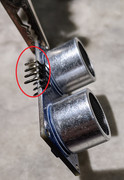
  2. In the pictures in STEP 1, you'll note the four pins stick-out, parallel to the circuit board. You'll need to bend these pins as shown here.
    Image
  3. Stick the pins in the corresponding holes on the WeMos board. Try to get the two circuit boards close together and coplanar.
    Image
  4. Double check the pins. If on the wrong side, or shifted over, it WON'T work!
    • Vcc to D7
    • Trig to D6
    • Echo to D5
    • Gnd to D0
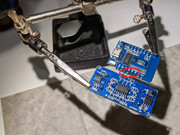
  5. Flip it over and solder the pins to the WeMos board.
    Image

Re: Cheap Electronic Water Bladder Level Meter

Posted: Sat Mar 06, 2021 7:31 am
by RADOM
First off, thank you so much for taking the time to leave such detailed information on how to tackle this project! The support is much appreciated! I've ordered the parts and they should all be here by the end of April (more likely August with my experience on shipping from overseas!).
I'll keep you posted and might have to ask a question or two once I start assembling and testing it.
Thanks,
Jeff

Re: Cheap Electronic Water Bladder Level Meter

Posted: Sat Mar 06, 2021 1:20 pm
by Inquisitor
RADOM wrote: Sat Mar 06, 2021 7:31 am First off, thank you so much for taking the time to leave such detailed information on how to tackle this project! The support is much appreciated! I've ordered the parts and they should all be here by the end of April (more likely August with my experience on shipping from overseas!).
I'll keep you posted and might have to ask a question or two once I start assembling and testing it.
Thanks,
Jeff
You're welcome. I enjoy making these things and helping people in my local Maker's Group. Now, I'm just going international. :D Ask away.

I'll be finishing up the rest of the project once I get the fixed DC-DC converter. I think it'll be a lot easier on anyone making things... me included and I want to use it in the pictures for this thread. It was suppose to be here today, but the AI doing the shipping prediction doesn't take into account the mule train that is required for the last leg. Tracking says its close... probably Monday.

If you don't mind sharing, you might offer up where you got the parts. It might help someone (me included)... to use or not use depending on your experience.

BTW, Do you plan on 3D printing the case? Do you have or have access to a 3D Printer? For instance... my local public library has one and will do parts for a nominal charge... $1 for normal people and free if you're part of my Maker's group. Not having that... I'll also publish the model on Thingiverse.com and they have services that will print it and send it to you. I've never used it, but I think that service is rather pricey. If you have your own printer...it's way cheaper. For me to print it, it cost $0.14.

Re: Cheap Electronic Water Bladder Level Meter

Posted: Sat Mar 06, 2021 6:12 pm
by RADOM
I went with the same parts you recommended - albeit from the Canadian version of EBay - which is several times more expensive. My parts list came out to $50 CDN but with multiple spares.

I was able to purchase 2 of the WeMos D1 Mini ESP8266 Modules from a distributor in Canada. He only had 2 left so I bought them both. They were $9CDN each with free shipping.
https://www.ebay.ca/itm/WeMos-D1-Mini-E ... 2749.l2649

I purchased a ten pack of the 5V fixed DC to DC converter for $13.44 and free shipping from China.
https://www.ebay.ca/itm/10PCS-MP1584EN- ... 2749.l2649

And I purchased a 10 pack of the sonic HC-SR04P for $10.86 and $6 shipping from China.
https://www.ebay.ca/itm/10PCS-Ultrasoni ... 2749.l2649

I do have access to a couple of different 3-D printers at the school where I teach, so making a case using the printer makes a lot of sense. That will be a new experience for me too! Some of the students have been making some pretty cool stuff on the machines so they can help me out with that when the time comes. They learn some math from me....and I can learn how to 3-D print from them. Win-Win!

Re: Cheap Electronic Water Bladder Level Meter

Posted: Sun Mar 07, 2021 5:46 am
by Inquisitor
At the rate my boat remodel is going (pretty good now that I can work outside) you'll probably still have it working with a real bladder under it before I do. I wonder if I might ask a few more questions of you. (Got to justify the Inquisitor handle :D ) Any advice you have on modifications to the design (hardware, software, or case) will quickly be incorporated... you being the first guinea-pig and all, its the least I could do. :o :D
  1. Students... Cool! Minions to do your printing for you. What do you teach?
  2. Did I see you have the same triangular Plastimo bladder that @ris has? And if not, what alternatives are there? I've never stepped foot on an X and I've not even unscrewed the bow panel of my M. The rest of the bilge is full of fiberglass razors and daggers. As I like to say, "If you didn't bleed on a project, you didn't have fun." I'm having a lot of fun lately. :D Did you have much clean-up to keep from poking a bladder? Any special extras (padding) you used?
  3. Is there much clearance above the bladder and under the panel? I just plan on using double sided tape to mount it to the panel. I made the unit as flat as possible (instead of stacking the circuit boards) to minimize the height (17 mm). As I noted above, the sensor doesn't work in the first 20 mm.
  4. I'm assuming that it is not only V shaped in the horizontal plane, but V shaped in vertical plane (in boat design parlance... station planes). Is that right? I've made a configuration/calibration screen and have added code to handle non-linear volume versus height bladders. Looks like you'll be able to test that out before I can.
  5. Printing - With the setting I use, it weights 12 grams and takes 50 minutes to print. I'm sure that's trivial to your students. The common material is PLA. Do you know if they can also print using ABS?
  6. How do you plan to access it under normal boating use? I kept all my old phones as they make great little computers in their own right. Not that I will, but I have enough to have one mounted in the berth, galley, head as well as the cockpit. Or will you just connect to it with your day-to-day phone? Would you see its power usage as a concern? Maybe add a remote switch to power just long enough to check the water level and then turn it off?
  7. I'm guessing you'll get the WeMos first. If you are interested in getting a head start, let me know. I can add some logic to do a "demo mode" that doesn't require the other components.
  8. Oh!... and please post pictures of your build and especially your installation!

Selling

Posted: Sun Mar 07, 2021 6:02 am
by Inquisitor
I don't really think there is a significant market for this item... here or anywhere else. Its not like its rocket science. For anyone who might want make and sell these... Go for it! I imagine if RADOM and I show that it actually works and is useful, there might be a couple of others on this forum that wouldn't mind having one. Besides, it could be used for other things as well...
  • Is your garage door open or closed
  • How far your car is to the back wall.
I state for the record, you may use any or all things discussed here including the parts list, binary code, and 3D printed model royalty free. I would appreciate you letting me know. I'd probably even make modifications for you free of charge. After you sell your million'th item, you can buy me a beer or three.